> ## Documentation Index
> Fetch the complete documentation index at: https://docs.typesafe.ai/llms.txt
> Use this file to discover all available pages before exploring further.
# OCR confidence and bounding boxes
> Check the values an OCR extractor read from invoice photos: Jev boxes each value, scores it against the page and against a crop of its box, and flags low scores for review.
Values that OCR extracts from invoice photos are mostly right, but checking every one by
hand takes as long as typing them in. Jev can check them instead: it boxes each value on
the photo and flags the ones that look wrong, so a reviewer only looks at those.
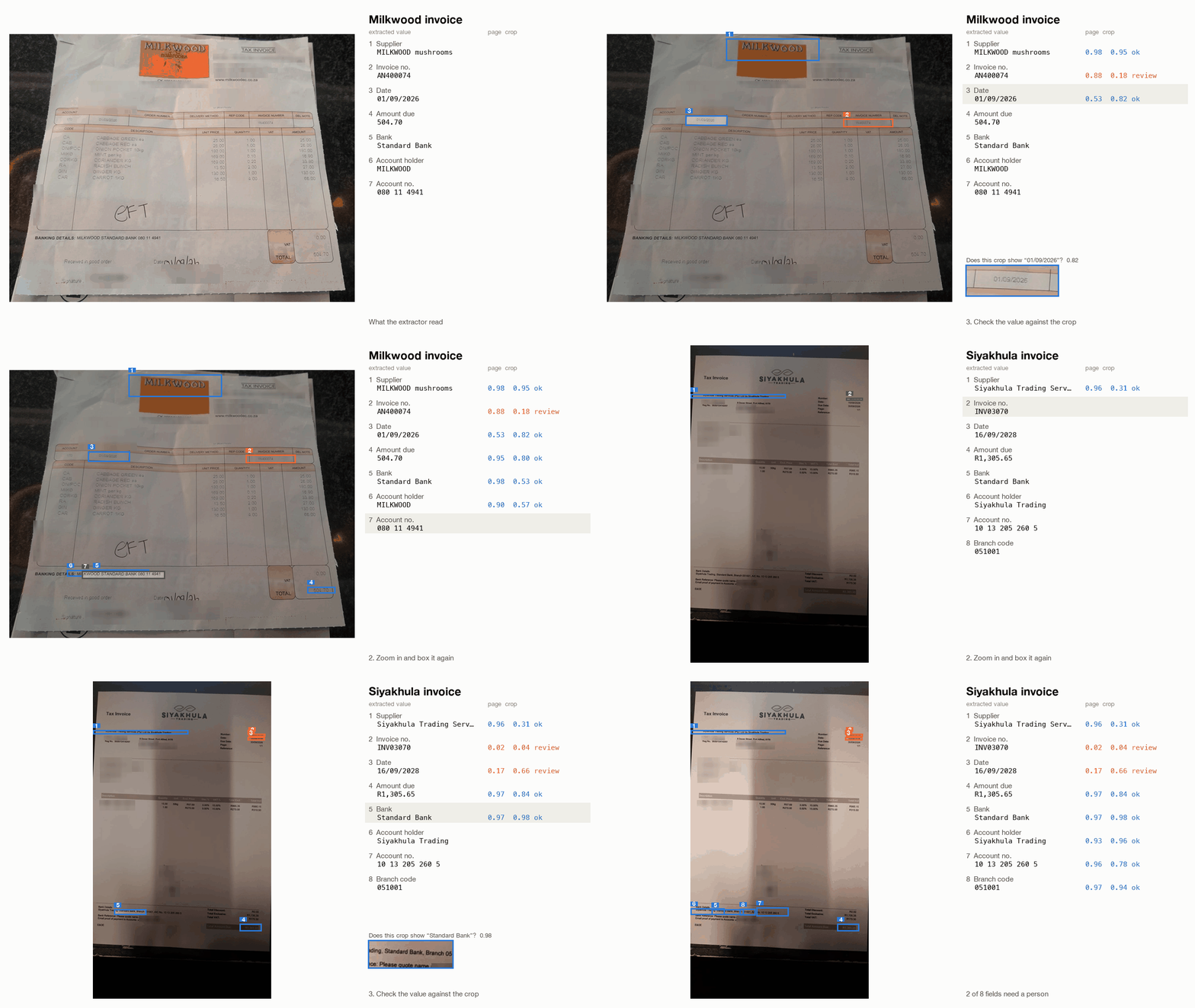
On these two supplier invoices, an extractor read the supplier, invoice number, date,
amount due and bank details, and got three values wrong. Jev flags all three.
Jev checks each value twice: against the whole page (the page check) and against a crop of
its box (the crop check). A value that scores below 0.25 on either check goes to review. In
the table, "extracted" is what the extractor read and "printed" is what the invoice says.
| invoice | field | extracted | printed | page check | crop check |
| - | - | - | - | - | - |
| Milkwood | invoice number | `AN400074` | `IN400074` | 0.88 | 0.18 |
| Siyakhula | invoice number | `INV03070` | `INV03079` | 0.02 | 0.04 |
| Siyakhula | date | `16/09/2028` | `16/09/2026` | 0.17 | 0.66 |
The code below starts from `extractions.json`, the values the OCR and LLM steps produced,
and leaves those two steps out. You can make that file with Tesseract and your LLM of
choice.
```mermaid actions={true} theme={null}
%%{init: {"fontFamily": "Inter, sans-serif", "flowchart": {"rankSpacing": 42, "nodeSpacing": 28, "wrappingWidth": 300, "subGraphTitleMargin": {"top": 12, "bottom": 36}}}}%%
flowchart TB
photo["invoice photo"]
subgraph EX["an OCR extractor"]
direction LR
ocr["OCR, local
photo → lines of text"]
llm["LLM, text only
lines → named fields"]
ocr --> llm
end
values["extracted values"]
subgraph JEV["this cookbook · three requests per invoice"]
direction LR
r1["request 1 · the photo
Box + Noul per field:
where is it, is the value that field?"]
r2["request 2 · zoomed regions
Box per field:
a tighter box"]
r3["request 3 · crops
Noul per field:
does the crop show the value?"]
r1 --> r2 --> r3
end
gate{"check_invoice()
either check low?"}
ok["passes"]
rv["review
boxed on the photo"]
photo --> EX --> values --> JEV
photo --> JEV
JEV --> gate
gate green_ok@--> ok
gate orange_review@--> rv
style EX fill:none,stroke:#71717a,stroke-width:1.5px,stroke-dasharray: 6 4
%% Branch colours (styles.css): node classes and green_/orange_ edge ids.
class ok neonGreen
class rv neonOrange
```
## Setup
```bash theme={null}
pip install ipython pillow 'typesafe-sdk[pil]>=0.7.5' 'cooksafe>=0.2.0,<0.3.0'
```
Then set `TYPESAFE_API_KEY`. Download the two invoice photos, `extractions.json` and
`json_cache.json` from
[typesafe-public-examples](https://github.com/typesafe-ai/typesafe-public-examples/tree/main/cookbooks/ocr_confidence_bounding_boxes),
and put them beside the script, with the photos in an `inputs/` folder.
Every API response is saved in `json_cache.json`, so running the cookbook reuses those
saved responses and you get the published numbers without calling the API. Delete that
file to send every request again.
> **Note** - Images and `Box` questions are dreamer-ready, which means they are not yet
> ready for production, and their request format and answers can change between releases.
> They need Jev 1.14, and every request needs the `TypeSafe-Danger-Zone-Images: true`
> header. The client below sets that header.
The numbers below came from `jev-1.14.0` on 2026-10-15.
```python theme={null}
import io
import json
import os
from pathlib import Path
from cooksafe import JsonCache
from IPython.display import display
from PIL import Image as PILImage
from PIL import ImageDraw, ImageFont
from typesafe_sdk import Box, Image, Noul, TypeSafeClient
TYPESAFE_MODEL = "jev-1.14.0" # Box questions need Jev 1.14
BAR = 0.25 # a check scoring below this flags the field
ZOOM = 3 # the zoomed region is three times the first box, and at least ZOOM_MIN of the page
ZOOM_MIN = (0.30, 0.15) # width, height as fractions of the page
GROW = (0.25, 0.20) # review margin around each box, as fractions of its width and height
MIN_SIDE, MAX_SIDE = 280, 1568 # the pixel range Jev accepts for each side of an image
client = TypeSafeClient(
api_key=os.environ.get("TYPESAFE_API_KEY", "cache-only"), # keyless kernels replay the cache
base_url=os.environ.get("TYPESAFE_ENDPOINT"),
headers={"TypeSafe-Danger-Zone-Images": "true"},
timeout=120.0,
)
json_cache = JsonCache(Path("json_cache.json"))
```
## Load the photos and what the extractor read
The two photos are invoices a restaurant received from its suppliers, taken with a phone.
One is a creased carbon copy from Milkwood Mushrooms. The other is from Siyakhula Trading
and has a shadow down the middle, making it a challenging OCR task.
The extracted values are in `extractions.json`. We used Apple Vision's text recognition
(OCR) to read the photos, and an LLM to read the output of that and return the structured
values. Any extractor works here, because the check only needs the photo and the values.
```python theme={null}
INPUTS = Path("inputs") # the photos, keyed in extractions.json by file name
EXTRACTIONS = json.loads(Path("extractions.json").read_text())
FIELDS = {
# field: what it is, in the words every question uses
"supplier_name": "the supplier's (seller's) business name",
"invoice_number": "the invoice or document number",
"invoice_date": "the invoice date",
"amount_due": "the final total amount payable",
"bank_name": "the name of the supplier's bank in the payment details",
"account_holder": "the account holder name in the supplier's bank details",
"account_number": "the supplier's bank account number",
"branch_code": "the supplier's bank branch code",
}
SAME_VALUE = "Ignore differences in spacing, punctuation, currency symbols and letter case."
for photo, values in sorted(EXTRACTIONS.items()):
with PILImage.open(INPUTS / photo) as page:
print(f"{photo} ({page.width} x {page.height} px)")
for field, value in values.items():
print(f" {field:<16}{value}")
```
```
milkwood.jpg (1393 x 1080 px)
supplier_name MILKWOOD mushrooms
invoice_number AN400074
invoice_date 01/09/2026
amount_due 504.70
bank_name Standard Bank
account_holder MILKWOOD
account_number 080 11 4941
siyakhula.jpg (899 x 1599 px)
supplier_name Siyakhula Trading Services (Pty) Ltd ta Siyakhula Trading
invoice_number INV03070
invoice_date 16/09/2028
amount_due R1,305.65
bank_name Standard Bank
account_holder Siyakhula Trading
account_number 10 13 205 260 5
branch_code 051001
```
Jev accepts images between 280 and 1568 pixels on each side. Larger images are shrunk, and
small crops are enlarged so their text is readable. An image that is still too small goes
in the middle of a white canvas, and its place on the canvas is kept, so a box Jev draws on
the canvas can be converted back to a position on the crop.
```python theme={null}
def as_image(picture: PILImage.Image, upscale_to: int | None = None) -> tuple[Image, tuple]:
picture = picture.convert("RGB")
if upscale_to and max(picture.size) < upscale_to:
scale = upscale_to / max(picture.size)
picture = picture.resize(
(round(picture.width * scale), round(picture.height * scale)), PILImage.LANCZOS
)
picture.thumbnail((MAX_SIDE, MAX_SIDE))
frame = (0.0, 0.0, 1.0, 1.0) # left, top, width, height of the picture on the canvas
if min(picture.size) < MIN_SIDE:
canvas = PILImage.new("RGB", (max(picture.width, MIN_SIDE), max(picture.height, MIN_SIDE)), "white")
x, y = (canvas.width - picture.width) // 2, (canvas.height - picture.height) // 2
canvas.paste(picture, (x, y))
frame = (x / canvas.width, y / canvas.height, picture.width / canvas.width,
picture.height / canvas.height)
picture = canvas
buffer = io.BytesIO()
picture.save(buffer, "JPEG", quality=90)
return Image(buffer.getvalue()), frame
def crop(photo: str, box: dict, pad: float = 0.0) -> PILImage.Image:
with PILImage.open(INPUTS / photo) as page:
w, h = page.size
return page.convert("RGB").crop((
max(0, int((box["left"] - pad) * w)), max(0, int((box["top"] - pad) * h)),
min(w, int((box["right"] + pad) * w)), min(h, int((box["bottom"] + pad) * h)),
))
```
## Find each field on the page
The first of the three requests sends the whole photo, with two questions for each field:
* A `Box` question that finds the field. It includes the extracted value as a hint about
which text to box. This box decides where to zoom in.
* A `Noul` question that asks whether the extracted value is that field on this page. Its
P(yes) is the first of the two checks, the page check.
```python expandable theme={null}
def page_questions(values: dict) -> dict:
questions = {}
for field, value in sorted(values.items()):
questions[f"box_{field}"] = Box(
instructions=f"{FIELDS[field]}, printed as “{value}” in `page`"
)
questions[f"fits_{field}"] = Noul(
instructions=f"Is “{value}” {FIELDS[field]} on `page`? {SAME_VALUE}"
)
return questions
@json_cache
def find_fields(photo: str, values_json: str) -> dict:
values = json.loads(values_json)
with PILImage.open(INPUTS / photo) as page:
image, _ = as_image(page) # a whole page fills the size range, so no canvas
response = client.system_one(
state={"page": image}, questions=page_questions(values), model=TYPESAFE_MODEL
)
return {
"boxes": {f: response.boxes[f"box_{f}"].box.model_dump() for f in sorted(values)},
"fits": {f: response.nouls[f"fits_{f}"].noul for f in sorted(values)},
}
found = {photo: find_fields(photo, json.dumps(values, sort_keys=True))
for photo, values in sorted(EXTRACTIONS.items())}
for photo, result in found.items():
print(photo)
for field, value in EXTRACTIONS[photo].items():
print(f" {field:<16}{value:<24.24} value fits the page {result['fits'][field]:.2f}")
```
```
milkwood.jpg
supplier_name MILKWOOD mushrooms value fits the page 0.98
invoice_number AN400074 value fits the page 0.88
invoice_date 01/09/2026 value fits the page 0.53
amount_due 504.70 value fits the page 0.95
bank_name Standard Bank value fits the page 0.98
account_holder MILKWOOD value fits the page 0.90
account_number 080 11 4941 value fits the page 0.35
siyakhula.jpg
supplier_name Siyakhula Trading Servic value fits the page 0.96
invoice_number INV03070 value fits the page 0.02
invoice_date 16/09/2028 value fits the page 0.17
amount_due R1,305.65 value fits the page 0.97
bank_name Standard Bank value fits the page 0.97
account_holder Siyakhula Trading value fits the page 0.93
account_number 10 13 205 260 5 value fits the page 0.96
branch_code 051001 value fits the page 0.97
```
The page check catches `INV03070` (0.02) and `16/09/2028` (0.17), but passes the misread
`AN400074` at 0.88. A photo of the whole page shows small print in little detail, so these
first boxes are rough.
## Zoom in and box each field again
For each field, cut out a region around its first box and enlarge it. The region is at
least 30% of the page wide and 15% high, so the field stays inside it even if the first box
was off. Then ask the same `Box` question about each region. Each region's image goes
inside its question's instructions, all the regions go in one request, and
`client.attach_assets()` sends the images with it.
The code then pads each new box on every side, so that cropping to it can't cut off part of
the value.
```python expandable theme={null}
def region_around(box: dict) -> dict:
width = min(1.0, max(ZOOM_MIN[0], (box["right"] - box["left"]) * ZOOM))
height = min(1.0, max(ZOOM_MIN[1], (box["bottom"] - box["top"]) * ZOOM))
left = min(max(0.0, (box["left"] + box["right"] - width) / 2), 1 - width)
top = min(max(0.0, (box["top"] + box["bottom"] - height) / 2), 1 - height)
return {"left": left, "top": top, "right": left + width, "bottom": top + height}
@json_cache
def zoom_fields(photo: str, values_json: str, boxes_json: str) -> dict:
values, boxes = json.loads(values_json), json.loads(boxes_json)
questions, regions, images = {}, {}, []
for field in sorted(values):
region = region_around(boxes[field])
image, frame = as_image(crop(photo, region), upscale_to=1200)
regions[field], images = (region, frame), images + [image]
questions[field] = Box(
instructions=f"{FIELDS[field]}, printed as “{values[field]}” in this image: {image}"
)
with client.attach_assets(images): # resolves the image references inside the text
response = client.system_one(
state={"task": "Locate fields in zoomed-in parts of a supplier invoice."},
questions=questions, model=TYPESAFE_MODEL,
)
tight = {}
for field, (region, (fx, fy, fw, fh)) in regions.items():
b = response.boxes[field].box
# canvas -> region -> page, then add the review margin
left, right = (b.left - fx) / fw, (b.right - fx) / fw
top, bottom = (b.top - fy) / fh, (b.bottom - fy) / fh
gx, gy = (right - left) * GROW[0], (bottom - top) * GROW[1]
rw, rh = region["right"] - region["left"], region["bottom"] - region["top"]
tight[field] = {
"left": max(0.0, region["left"] + (left - gx) * rw),
"top": max(0.0, region["top"] + (top - gy) * rh),
"right": min(1.0, region["left"] + (right + gx) * rw),
"bottom": min(1.0, region["top"] + (bottom + gy) * rh),
}
return {"boxes": tight}
```
## Check each value against its crop
Crop the photo to each padded box and ask one `Noul` question per field: does this crop
show the extracted value? Each crop goes inside its own question's instructions. The
answer's P(yes) is the crop check.
```python theme={null}
@json_cache
def check_crops(photo: str, values_json: str, boxes_json: str) -> dict:
values, boxes = json.loads(values_json), json.loads(boxes_json)
questions, images = {}, []
for field in sorted(values):
image, _ = as_image(crop(photo, boxes[field], pad=0.01), upscale_to=800)
images.append(image)
questions[field] = Noul(
instructions=f"Image: {image}\nDoes this cropped image clearly show {FIELDS[field]}"
f" as “{values[field]}”? {SAME_VALUE} Answer no if it is cut off, unreadable or"
" different."
)
with client.attach_assets(images):
response = client.system_one(
state={"task": "Check values read from cropped parts of a supplier invoice."},
questions=questions, model=TYPESAFE_MODEL,
)
return {
"shows": {f: response.nouls[f].noul for f in sorted(values)},
}
```
## Flag the fields a person should check
A field goes to review when either check scores below `BAR` (0.25).
```python theme={null}
def check_invoice(photo: str, values: dict) -> dict:
values_json = json.dumps(values, sort_keys=True)
first = find_fields(photo, values_json)
tight = zoom_fields(photo, values_json, json.dumps(first["boxes"], sort_keys=True))
shown = check_crops(photo, values_json, json.dumps(tight["boxes"], sort_keys=True))
return {
field: {
"value": values[field],
"box": tight["boxes"][field],
"fits": first["fits"][field],
"shows": shown["shows"][field],
"review": first["fits"][field] < BAR or shown["shows"][field] < BAR,
}
for field in sorted(values)
}
checked = {photo: check_invoice(photo, values) for photo, values in sorted(EXTRACTIONS.items())}
KEY = {field: n for n, field in enumerate(FIELDS, 1)} # the number drawn on each box below
print(f"{'photo':<15}{'#':<3}{'field':<16}{'extracted':<26}{'fits page':>10}{'crop':>7} verdict")
for photo, fields in checked.items():
for field, r in sorted(fields.items(), key=lambda item: KEY[item[0]]):
verdict = "REVIEW" if r["review"] else "ok"
print(f"{photo:<15}{KEY[field]:<3}{field:<16}{r['value']:<26.26}{r['fits']:>10.2f}"
f"{r['shows']:>7.2f} {verdict}")
```
```
photo # field extracted fits page crop verdict
milkwood.jpg 1 supplier_name MILKWOOD mushrooms 0.98 0.95 ok
milkwood.jpg 2 invoice_number AN400074 0.88 0.18 REVIEW
milkwood.jpg 3 invoice_date 01/09/2026 0.53 0.82 ok
milkwood.jpg 4 amount_due 504.70 0.95 0.80 ok
milkwood.jpg 5 bank_name Standard Bank 0.98 0.53 ok
milkwood.jpg 6 account_holder MILKWOOD 0.90 0.57 ok
milkwood.jpg 7 account_number 080 11 4941 0.35 0.92 ok
siyakhula.jpg 1 supplier_name Siyakhula Trading Services 0.96 0.31 ok
siyakhula.jpg 2 invoice_number INV03070 0.02 0.04 REVIEW
siyakhula.jpg 3 invoice_date 16/09/2028 0.17 0.66 REVIEW
siyakhula.jpg 4 amount_due R1,305.65 0.97 0.84 ok
siyakhula.jpg 5 bank_name Standard Bank 0.97 0.98 ok
siyakhula.jpg 6 account_holder Siyakhula Trading 0.93 0.96 ok
siyakhula.jpg 7 account_number 10 13 205 260 5 0.96 0.78 ok
siyakhula.jpg 8 branch_code 051001 0.97 0.94 ok
```
Neither check catches all three misreads alone. The crop check catches `AN400074` (0.18),
which the page check passed at 0.88. The page check catches `16/09/2028` (0.17), which the
crop check passed at 0.66. Both catch `INV03070`.
All the correct values pass both checks. The lowest scores among them are the Milkwood
account number at 0.35 on the page check and the Siyakhula supplier name at 0.31 on the
crop check.
On each photo, every box is numbered as in the `#` column above. Orange marks a field to
review and blue one that passed, so a reviewer can check each value where it is printed.
```python theme={null}
BLUE, ORANGE = "#2a78d6", "#eb6834"
def annotate(photo: str, fields: dict) -> PILImage.Image:
with PILImage.open(INPUTS / photo) as page:
page = page.convert("RGB")
draw = ImageDraw.Draw(page)
font = ImageFont.load_default(size=max(14, page.width // 60))
for field, r in fields.items():
colour = ORANGE if r["review"] else BLUE
b = r["box"]
xy = (b["left"] * page.width, b["top"] * page.height,
b["right"] * page.width, b["bottom"] * page.height)
draw.rectangle(xy, outline=colour, width=max(3, page.width // 300))
label = f" {KEY[field]} " # a small badge keeps fields on one printed line legible
tx, ty = xy[0], max(0, xy[1] - font.size - 4)
draw.rectangle(draw.textbbox((tx, ty), label, font=font), fill=colour)
draw.text((tx, ty), label, fill="white", font=font)
return page
for photo, fields in checked.items():
display(annotate(photo, fields))
```


This documentation is built and hosted on [Mintlify](https://mintlify.com), a developer documentation platform.