> ## Documentation Index
> Fetch the complete documentation index at: https://docs.typesafe.ai/llms.txt
> Use this file to discover all available pages before exploring further.
# Box
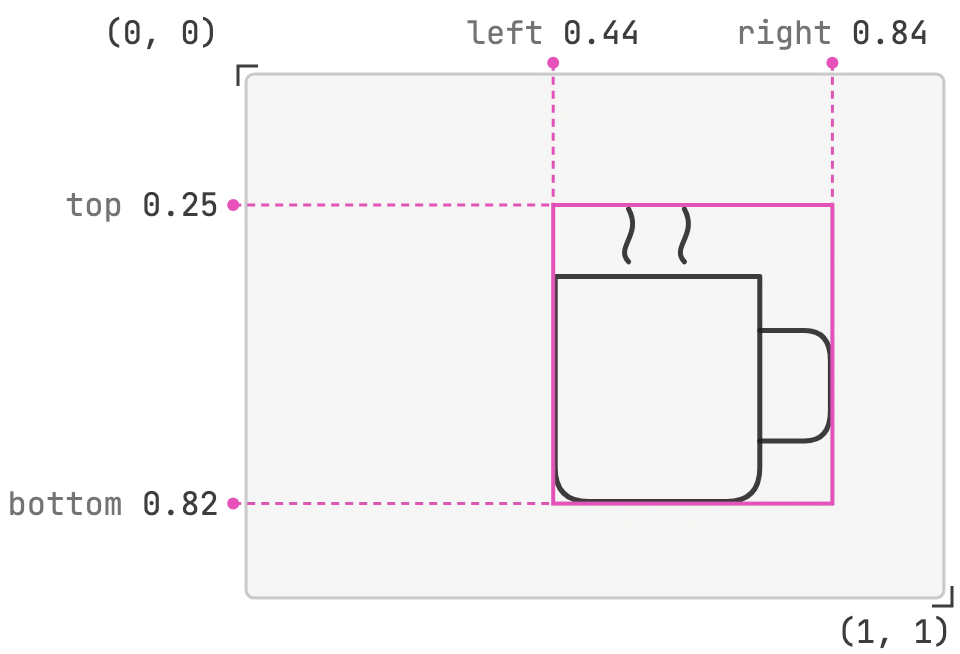
> A Box is a System One question type for finding where something is in an image. The answer is the four edges of a box around it, as fractions of the image's width and height.
**Dreamer-ready.** Images and Box questions aren't yet up to our standards to call ready for production, but we're excited for dreamers and builders to play with them. Use them to build prototypes and try ideas. The request format, the answers, and the limits on this page can change between releases, and accuracy will change as we update the models. Tell us what you build, and what breaks, on [Discord](https://discord.gg/typesafe).
To use images or Box questions, send the `TypeSafe-Danger-Zone-Images: true` header with each request that contains an image or a Box question. See [Turning on images](/images#turning-on-images).
Use a Box when you need to know where something is in an image: the mug on the counter, the signature on a scanned form, the person at the door. The answer is a bounding box, the smallest rectangle that contains the target, given as four edges. A Box question needs an image in the request; see [Images](/images) for how to send one. Box questions need Jev 1.14: send `jev-preview` or `jev-1.14.0` as the `model`.
Each edge is a fraction of the image's size, measured from the top-left corner. `left` and `right` are fractions of the width, and `top` and `bottom` are fractions of the height, so the same answer works at any image size.
 ## Request structure
A Box question has two fields:
* `type`: Always `"box"`.
* `instructions`: What to find, and in which image. It doesn't have to be a question: "the coffee mug in `photo`" is enough.
Box takes no `criteria`. This request finds a mug in a kitchen photo, sent as a file part with the images header:
```bash theme={null}
curl https://api.typesafe.ai/v1/systemone \
-H "Authorization: Bearer $TYPESAFE_API_KEY" \
-H "TypeSafe-Danger-Zone-Images: true" \
-F 'request={
"model": "jev-preview",
"state": {"photo": "6e1d0b7c-kitchen"},
"assets": {"6e1d0b7c-kitchen": {"type": "image", "part": "kitchen-photo"}},
"questions": {
"mug": {"type": "box", "instructions": "the coffee mug in `photo`"}
}
};type=application/json' \
-F 'kitchen-photo=@kitchen.jpg;type=image/jpeg'
```
To send the photo base64-encoded in a JSON body, or to use the SDKs, see [Uploading images](/images#uploading-images).
A request can mix Box questions with the other types, and every question is evaluated against the same state.
## Response structure
```json theme={null}
{
"model": "jev-1.14.0",
"answers": {
"mug": {
"type": "box",
"box": {
"top": 0.25,
"bottom": 0.82,
"left": 0.44,
"right": 0.84
},
"confidence": 0.92
}
},
"usage": {"input_tokens": 290, "output_tokens": 21}
}
```
Each Box answer has these values:
* `type`: The type of TypeSafe question.
* `box`: The four edges, `top`, `bottom`, `left`, and `right`, each from 0 to 1. `left` is less than `right`, and `top` is less than `bottom`.
* `confidence`: A number from 0 to 1. Higher means the model is more sure of its answer. See [Using confidence](#using-confidence).
## Reading a Box
To draw the box or crop to it, multiply each edge by the image's width or height in pixels:
```python theme={null}
from PIL import Image
image = Image.open("kitchen.jpg")
width, height = image.size
mug = response["answers"]["mug"]
edges = mug["box"]
box = (
round(edges["left"] * width),
round(edges["top"] * height),
round(edges["right"] * width),
round(edges["bottom"] * height),
)
image.crop(box).save("mug.jpg")
```
### Using confidence
How you act on a Box's confidence is up to your application. A common pattern is to pick a threshold and treat answers below it with more care. There is no recommended threshold yet, so tune it on your own images. When confidence is below your threshold, you can:
* **Ask again on a better image.** Send a larger version of the image, or crop to the region around the box at a higher resolution and ask the same Box question on the crop. [Writing Box questions](#writing-box-questions) covers finding a small target in a large image.
* **Pad the box before cropping.** When a crop must not cut off any part of the target, move each edge outward before you crop.
* **Check the box with edge questions.** Ask whether the target continues past each edge, as in [Check a box with edge questions](#check-a-box-with-edge-questions).
This code pads the box when confidence is below a threshold, and keeps it inside the image:
```python theme={null}
PAD = 0.05 # Fraction of the image to add on each side. Tune for your images.
MIN_CONFIDENCE = 0.6 # Example threshold. Tune it on your own images.
if mug["confidence"] < MIN_CONFIDENCE:
edges = {
"left": max(0.0, edges["left"] - PAD),
"top": max(0.0, edges["top"] - PAD),
"right": min(1.0, edges["right"] + PAD),
"bottom": min(1.0, edges["bottom"] + PAD),
}
```
Then crop with the padded `edges` as in the code above.
## Writing Box questions
**Name the target and the image.** "The coffee mug in `photo`" names what to find and where. When the request has several images, the path in backticks identifies which one to search.
**The target can be a picture.** Put the reference for the target image directly in the instructions:
```json theme={null}
"instructions": "the person in `photo` who matches this badge photo: 9a21c7d3-badge"
```
**A Box answer is always a box.** There is no "not found" answer, so a Box question about something absent still returns four edges. In the same request, ask a [Noul](/primitives/noul) whether the target is in the image, and ignore the box when the Noul answer is low:
```json theme={null}
"questions": {
"mug_visible": {"type": "noul", "instructions": "Is there a coffee mug in `photo`?"},
"mug": {"type": "box", "instructions": "the coffee mug in `photo`"}
}
```
**One box per question.** Box is designed to find one target, and every answer is a single box. To find several different things, ask one Box question for each in the same request. When the image might hold more than one of the same thing, describe the one you want so that only it fits: "the mug nearest the sink in `photo`". When you can't tell them apart in words, add a Choice with the options `none`, `one`, and `several` next to the Box. When the answer is `several`, split the image into regions and ask again on each.
**Crop large images before looking for small things.** A target a few dozen pixels wide in a very large image can be missed. Find the region first, for example with a Choice that has tiles of the image as its options. Then ask the Box question on that tile, and convert its edges back to fractions of the full image.
### Check a box with edge questions
To check whether a box cuts off part of the target, crop to the box and ask one Noul per edge, such as "Does the mug in `crop` continue past the left edge of the image?". Move out each edge where the Noul answer is yes, and ask again.
On 36 test crops of paintings, each with a known part of the target cut off, the four edge questions caught 30 of the cuts. A single "Is all of the mug inside `crop`?" question caught 26. Drawing the box as an outline on the full image and asking about that caught 20.
This documentation is built and hosted on [Mintlify](https://mintlify.com), a developer documentation platform.
## Request structure
A Box question has two fields:
* `type`: Always `"box"`.
* `instructions`: What to find, and in which image. It doesn't have to be a question: "the coffee mug in `photo`" is enough.
Box takes no `criteria`. This request finds a mug in a kitchen photo, sent as a file part with the images header:
```bash theme={null}
curl https://api.typesafe.ai/v1/systemone \
-H "Authorization: Bearer $TYPESAFE_API_KEY" \
-H "TypeSafe-Danger-Zone-Images: true" \
-F 'request={
"model": "jev-preview",
"state": {"photo": "6e1d0b7c-kitchen"},
"assets": {"6e1d0b7c-kitchen": {"type": "image", "part": "kitchen-photo"}},
"questions": {
"mug": {"type": "box", "instructions": "the coffee mug in `photo`"}
}
};type=application/json' \
-F 'kitchen-photo=@kitchen.jpg;type=image/jpeg'
```
To send the photo base64-encoded in a JSON body, or to use the SDKs, see [Uploading images](/images#uploading-images).
A request can mix Box questions with the other types, and every question is evaluated against the same state.
## Response structure
```json theme={null}
{
"model": "jev-1.14.0",
"answers": {
"mug": {
"type": "box",
"box": {
"top": 0.25,
"bottom": 0.82,
"left": 0.44,
"right": 0.84
},
"confidence": 0.92
}
},
"usage": {"input_tokens": 290, "output_tokens": 21}
}
```
Each Box answer has these values:
* `type`: The type of TypeSafe question.
* `box`: The four edges, `top`, `bottom`, `left`, and `right`, each from 0 to 1. `left` is less than `right`, and `top` is less than `bottom`.
* `confidence`: A number from 0 to 1. Higher means the model is more sure of its answer. See [Using confidence](#using-confidence).
## Reading a Box
To draw the box or crop to it, multiply each edge by the image's width or height in pixels:
```python theme={null}
from PIL import Image
image = Image.open("kitchen.jpg")
width, height = image.size
mug = response["answers"]["mug"]
edges = mug["box"]
box = (
round(edges["left"] * width),
round(edges["top"] * height),
round(edges["right"] * width),
round(edges["bottom"] * height),
)
image.crop(box).save("mug.jpg")
```
### Using confidence
How you act on a Box's confidence is up to your application. A common pattern is to pick a threshold and treat answers below it with more care. There is no recommended threshold yet, so tune it on your own images. When confidence is below your threshold, you can:
* **Ask again on a better image.** Send a larger version of the image, or crop to the region around the box at a higher resolution and ask the same Box question on the crop. [Writing Box questions](#writing-box-questions) covers finding a small target in a large image.
* **Pad the box before cropping.** When a crop must not cut off any part of the target, move each edge outward before you crop.
* **Check the box with edge questions.** Ask whether the target continues past each edge, as in [Check a box with edge questions](#check-a-box-with-edge-questions).
This code pads the box when confidence is below a threshold, and keeps it inside the image:
```python theme={null}
PAD = 0.05 # Fraction of the image to add on each side. Tune for your images.
MIN_CONFIDENCE = 0.6 # Example threshold. Tune it on your own images.
if mug["confidence"] < MIN_CONFIDENCE:
edges = {
"left": max(0.0, edges["left"] - PAD),
"top": max(0.0, edges["top"] - PAD),
"right": min(1.0, edges["right"] + PAD),
"bottom": min(1.0, edges["bottom"] + PAD),
}
```
Then crop with the padded `edges` as in the code above.
## Writing Box questions
**Name the target and the image.** "The coffee mug in `photo`" names what to find and where. When the request has several images, the path in backticks identifies which one to search.
**The target can be a picture.** Put the reference for the target image directly in the instructions:
```json theme={null}
"instructions": "the person in `photo` who matches this badge photo: 9a21c7d3-badge"
```
**A Box answer is always a box.** There is no "not found" answer, so a Box question about something absent still returns four edges. In the same request, ask a [Noul](/primitives/noul) whether the target is in the image, and ignore the box when the Noul answer is low:
```json theme={null}
"questions": {
"mug_visible": {"type": "noul", "instructions": "Is there a coffee mug in `photo`?"},
"mug": {"type": "box", "instructions": "the coffee mug in `photo`"}
}
```
**One box per question.** Box is designed to find one target, and every answer is a single box. To find several different things, ask one Box question for each in the same request. When the image might hold more than one of the same thing, describe the one you want so that only it fits: "the mug nearest the sink in `photo`". When you can't tell them apart in words, add a Choice with the options `none`, `one`, and `several` next to the Box. When the answer is `several`, split the image into regions and ask again on each.
**Crop large images before looking for small things.** A target a few dozen pixels wide in a very large image can be missed. Find the region first, for example with a Choice that has tiles of the image as its options. Then ask the Box question on that tile, and convert its edges back to fractions of the full image.
### Check a box with edge questions
To check whether a box cuts off part of the target, crop to the box and ask one Noul per edge, such as "Does the mug in `crop` continue past the left edge of the image?". Move out each edge where the Noul answer is yes, and ask again.
On 36 test crops of paintings, each with a known part of the target cut off, the four edge questions caught 30 of the cuts. A single "Is all of the mug inside `crop`?" question caught 26. Drawing the box as an outline on the full image and asking about that caught 20.
This documentation is built and hosted on [Mintlify](https://mintlify.com), a developer documentation platform.