

The problem
Most companies and projects gain content over time until no one person can understand all of it, or know where to spend effort improving it. The Django documentation has 279 pages and 584,234 words, not counting release notes. Reading them once takes a person about 39 hours. There are different kinds of content and different kinds of errors, and some pages are much more important than others. But which?Why Jev fits
Jev turns large amounts of text into numbers. Instead of writing hundreds of manual rules, you can ask questions in natural language: Is this page out of date? Is it a tutorial or a reference page? Is it for beginners or experts? Jev answers dozens of these about a page in one request and returns a probability or a score for each, so you can sort, filter, and plot the results.One request per page
Each request holds one page and 45 questions:
Jev answers every question in a request in parallel, so more questions add little time: on one test page, the median request took 144 ms with 1 question and 151 ms with all 45. Questions do add cost, because their text counts as input tokens: here, the 45 questions are about 40% of the $0.10. This audit asks every question that might be useful, including ones that flag only a handful of pages. There is no limit on the number of questions, only on context length.
Visualizing the results
You can build any dashboard or visualization from Jev’s answers. Here, we plotted each page on an importance and quality grid, so it’s easy to see the pages that most deserve human attention: the low-quality, high-importance quadrant in the top left, labeled “Fix first”. The dashboard also lists quick wins: important pages that Jev rates trivial or small to fix. Depending on what matters to you, the grid could instead show fix effort, page complexity, or anything else.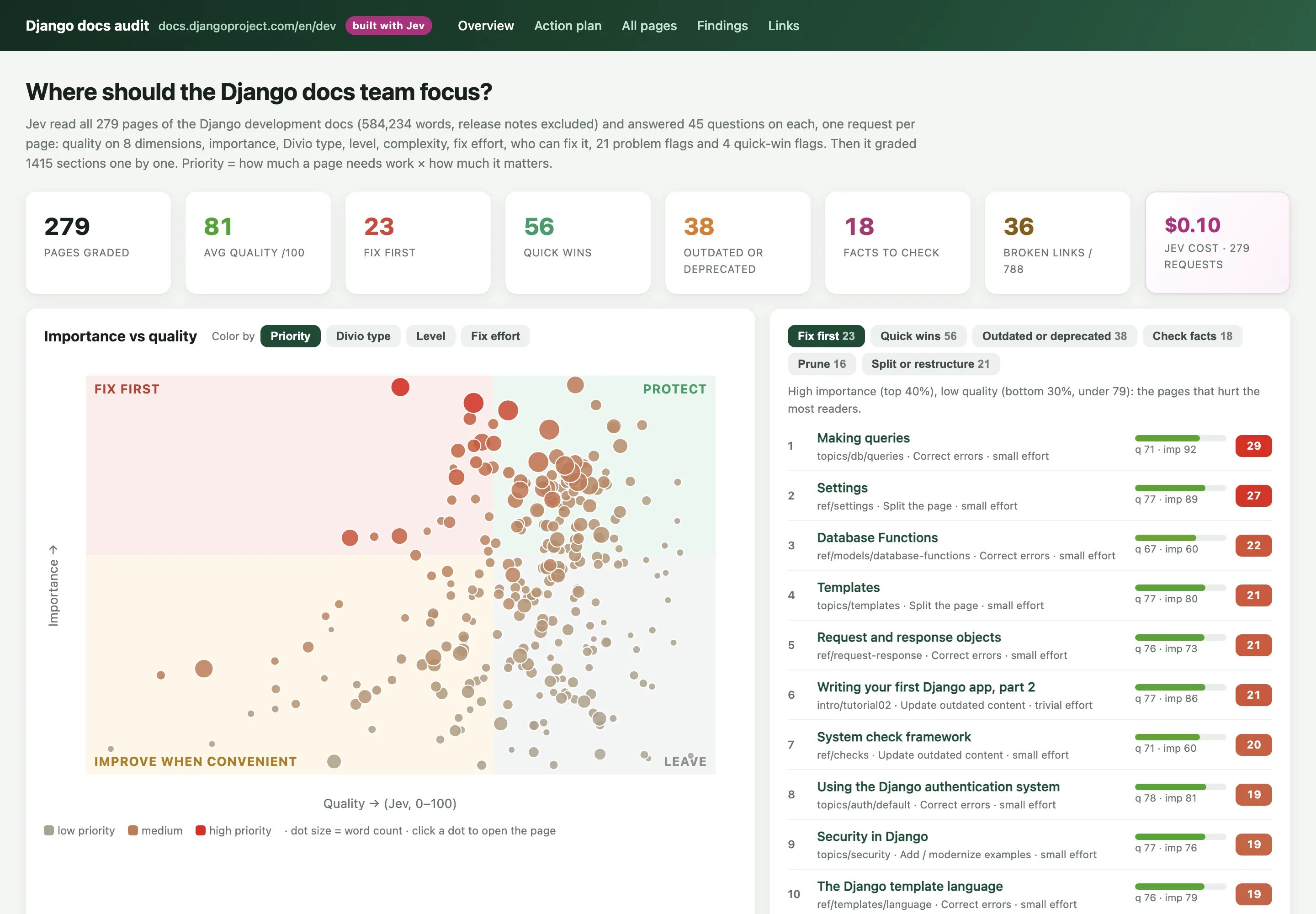
What the questions found
Each problem and quick-win question is a yes-or-no flag. The left side of the chart counts how many of the 279 pages each one flagged. The right side shows how the pages split on four of the classification questions. Most Django pages are reference or explanation pages for intermediate developers, and quick to fix. The common flags are small jobs, like adding cross-links or a diagram, or explaining jargon. The serious flags fire on far fewer pages: 28 show a deprecated API, 18 may contain an incorrect fact, and 13 have out-of-date content. Those are short lists to check by hand.Find the exact sentence
Each page in the audit has a deep scan button. It asks Jev which sentence holds each problem, and highlights that sentence. Here, it flags a sentence on the Django admin page with two typos: “it’s” should be “its”, and “as” should be “are”.
Build it
Get an API key
Create a key in the TypeSafe console.
Question types
Score, Choice and Noul, and when to use each.
# ... comment marks where the other 38 go. It sends 12 pages at a time and lists the 20 pages with the highest priority. Its priority is simpler than the dashboard’s: (1 − overall quality) × importance, so its list can differ from the dashboard’s “Fix first” list.
The scoring pass in Python
The scoring pass in Python
audit.py
docs/ folder of django/django at commit ca3f31b (4 November 2026), under Django’s BSD license. Release notes are left out.