

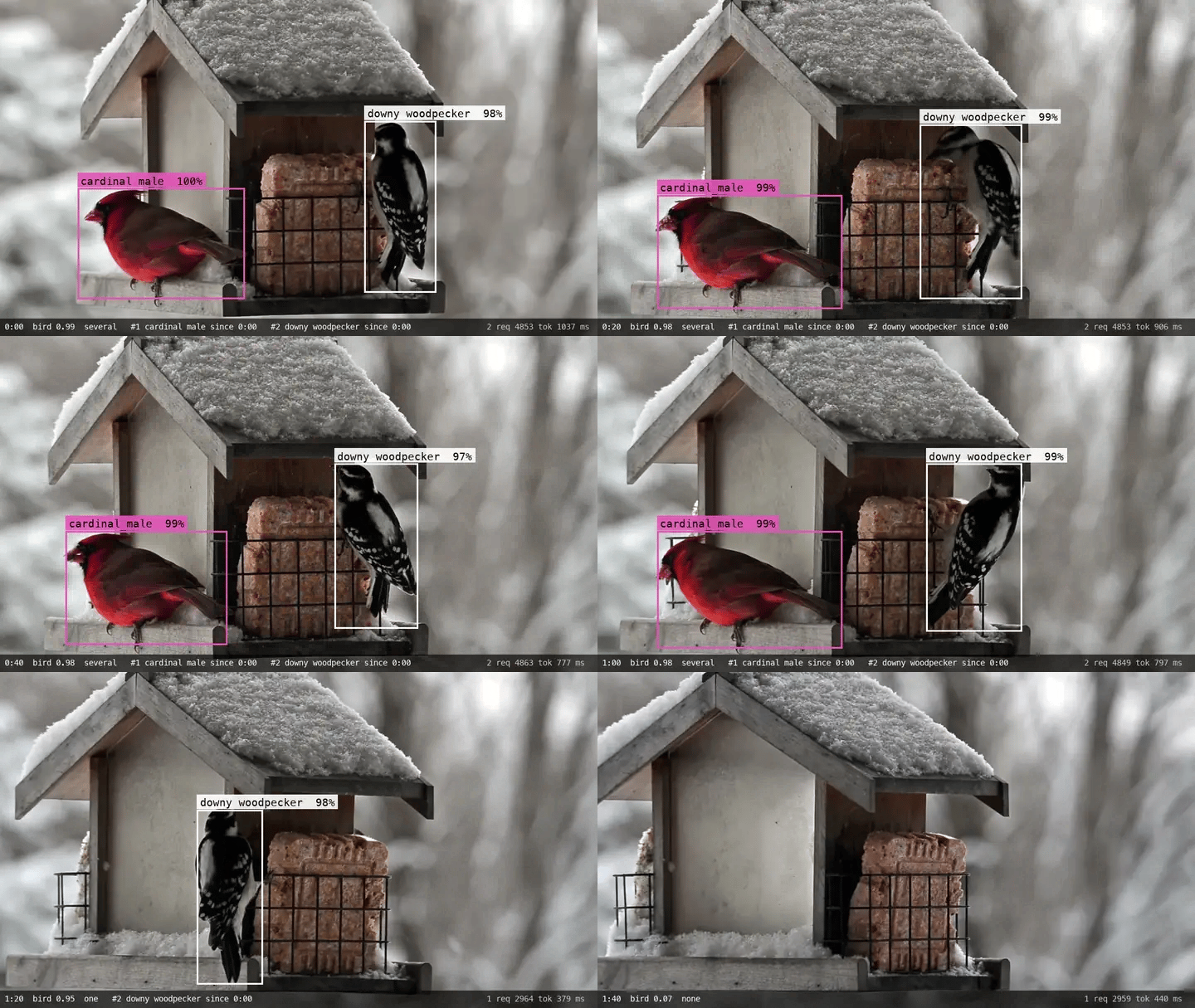
bird_present, aNoul: is there a bird?how_many, aChoiceof none, one, or severalbird, aBox: where is the most prominent bird?species_leftandspecies_right, twoChoicequestions over a list of species: what are the leftmost and rightmost birds?
Note - Images and Box questions are experimental (“dreamer-ready”). Every request
that carries an image or a Box question needs the TypeSafe-Danger-Zone-Images: true
header. See Images and Box.
Setup
Requires Python 3.10 or later. Choose a package manager to install the dependencies:- pip
- uv
Create a virtual environment and add the dependencies:
feeder_watch.py. As you work through this cookbook, copy each
Python code block into that file, in order. This command runs it whether you installed
with pip or uv:
json_cache.json, so a second run makes no requests. To replay
the published numbers without an API key, download json_cache.json into the
folder you run the script from.
Numbers below came from jev-1.14.0 on 2026-10-15.
Download the frames
The footage is “Busy Bird Feeder”, a 101-second clip filmed by Courtney Celley of the U.S. Fish and Wildlife Service and released into the public domain. For the first minute, a male cardinal and a downy woodpecker share the feeder, so most frames hold two birds of different species. After that, the male cardinal leaves and a female cardinal feeds from behind the feeder, mostly out of sight. We cut one frame a second at 1024 × 576 pixels, and labeled each frame by hand with the species of every bird in full view. Twenty-two frames are markedpartial, because the
female cardinal in them is cut off at the edge or mostly hidden behind the feeder.
The frames are in usfws_frames.zip and the labels are in
usfws_labels.json, both in typesafe-public-examples. The source and the
changes made are in
DATA_LICENSE.md. The code below downloads both, unzips the frames into
usfws_frames/, and skips anything that is already on disk.
Write the questions
Each request sends one frame as the state, under the keyframe, and asks five questions
about it. All five share the one request, so the image is sent once.
- The
bird_presentquestion is aNoul. Below 0.5, the frame counts as empty and the code ignores the other answers. A Box question always returns a box, even when there is nothing to find, so this answer is what tells the code whether to use the box. - The
how_manyquestion is aChoiceovernone,one, andseveral. The code asks for a second box only when the answer isseveral. - The
birdquestion is aBoxaround the most prominent bird. Frames with one bird use this box. - The
species_leftandspecies_rightquestions are the sameChoice, over ten species plusother, asked about the leftmost and the rightmost bird. With one bird in the frame, both answers describe it. With two, each answer describes one bird.
Ask about one frame
Each request sends one frame and a set of questions, with the model version and the images header set above. The three frames below have two birds, one bird, and no bird.several, with the cardinal on the left, the woodpecker on
the right, and both species answers near 1.00. On the one-bird frame, the left and right
answers both name the woodpecker. On the empty frame, bird_present is low, so the code
ignores the box and the species answers. Those answers still name an option, here other.
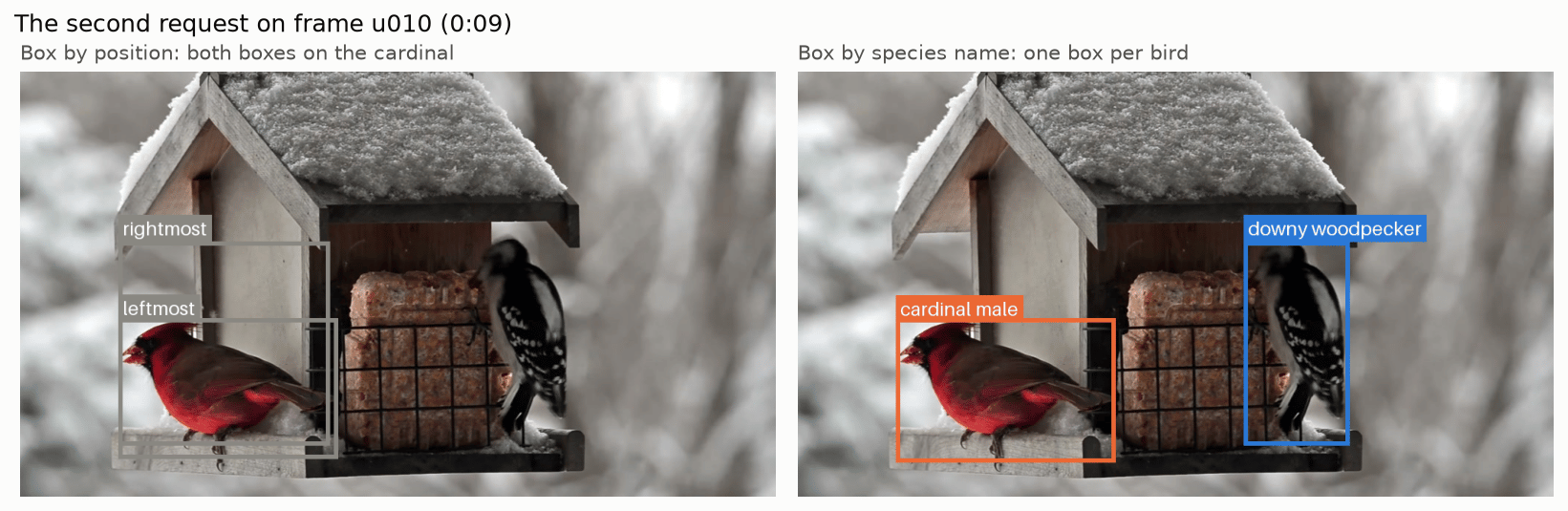
On the two-bird frame, the bird box covers only the cardinal. One Box question returns
one box, so the woodpecker needs a question of its own.
Box each bird by its species
We need two Box questions, one for “the leftmost bird” and one for “the rightmost bird”. On this feeder, both boxes landed on the cardinal.BOX_TARGETS. Where the name alone could also fit another bird, the phrase
adds what the bird looks like.
Ask about every frame
For each frame:- Send the five questions. Stop there if
bird_presentis below 0.5, or if neither species answer reaches 0.5. - If
how_manyisseveraland the two species answers name different species, send the second request for one box per species, then rundedupe()on the boxes. Do the same when only one side’s answer reaches 0.5, because thebirdbox might be around the other bird. - Otherwise, keep the most likely species and the
birdbox from the first request.
pool.map keeps the order of its input. On
a live camera, send one frame at a time instead, each as soon as the previous answer is
back.
dedupe() kept
one.
Turn answers into visits
Visits are built from the results in frame order, one species at a time, so two birds at the feeder at once make two overlapping visits. Three settings decide what counts as a visit:- A frame counts toward a species when that species’ probability is at least
species_at. - A visit stays open through gaps of up to
max_gapframes, such as when the bird hops out of view for a moment. - A visit needs at least
min_framesframes that name its species. With the default of 2, a wrong answer on a single frame doesn’t become a visit.
visits() on the saved results. No new requests are needed.
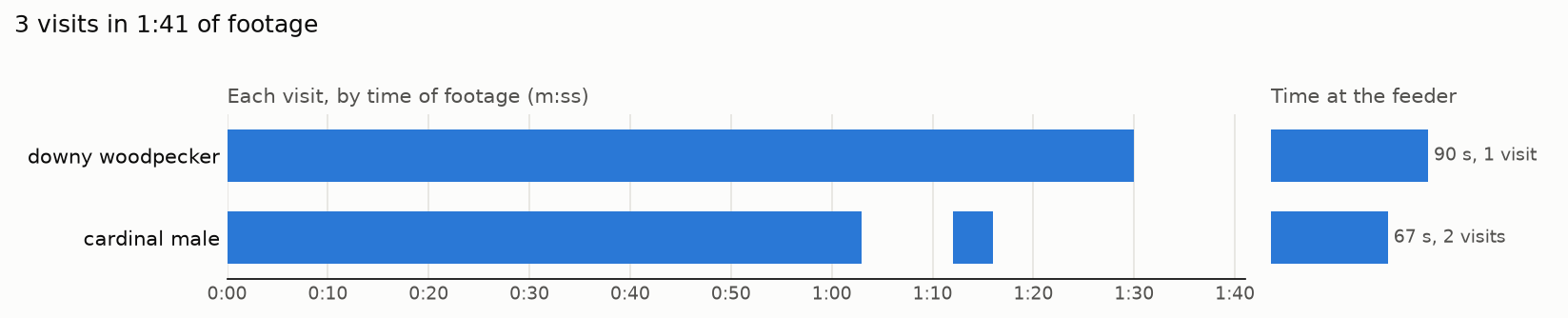
min_frames to 1 shows the single-frame sightings that the default of 2 keeps out
of the log:
min_frames keeps more wrong answers
out of the log, and it also drops more birds that only show up for a second or two.
Check the answers against the labels
Two checks compare the answers with the hand labels:- whether
bird_presentagrees with the label on whether the frame has a bird in it - whether every labeled bird’s species is among the species that
ask_frame()returned
partial counts as having a bird for the first check. It is left out of the
second, because its label doesn’t name every bird in it.
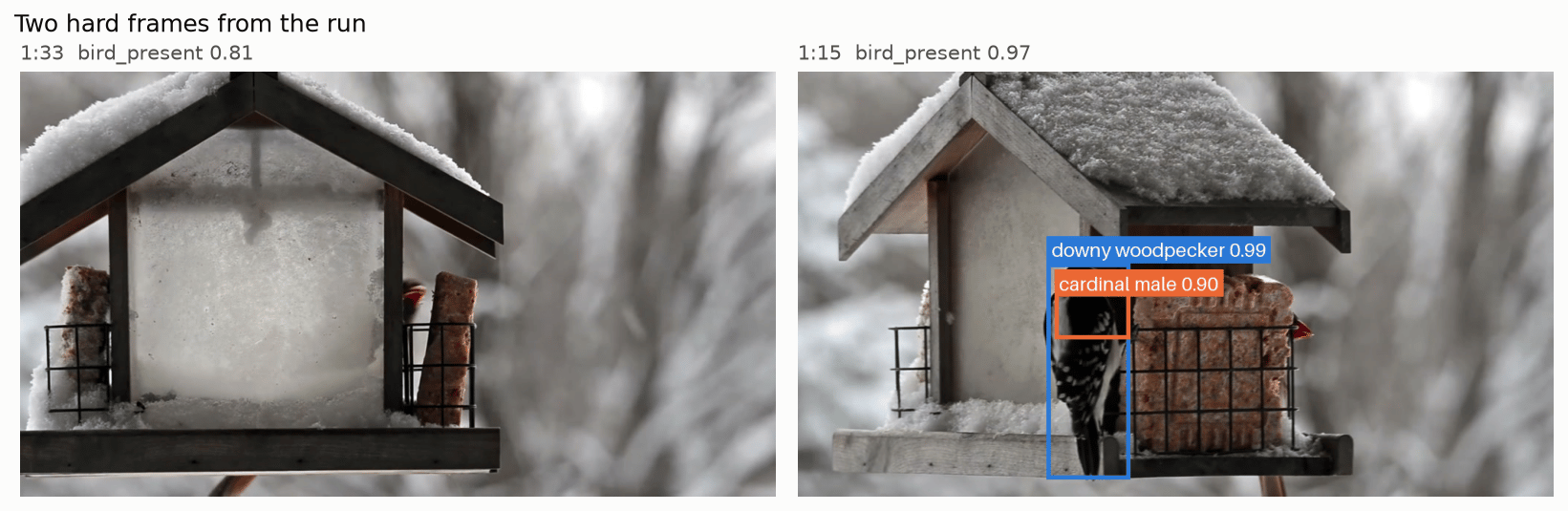
bird_present are 1:33 and 1:34, where only part of a cardinal
shows; the left half of the figure below is 1:33. Jev scored both at about 0.8 and counted
the bird, and the labels mark both partial.
The one labeled bird that Jev missed is the woodpecker at 1:02, which shares the frame with
the male cardinal. That frame came back with only the male cardinal.
The right half of the figure shows a failure that dedupe() doesn’t catch. At 1:15, the
female cardinal’s beak shows at the right edge of the cage, and Jev named a male cardinal.
The box for the male cardinal landed on the woodpecker. It overlaps the woodpecker’s own
box by less than 0.6, so both boxes stay. A check on each box would catch this: crop to the
box and ask a Noul question whether the bird in the crop is a male cardinal.
See it running live
The same questions work on live footage. The video below shows a small web app built on them. It takes a frame from a webcam or a video file, asks Jev, draws the boxes, and keeps a running visit log. In the video, it plays a stretch of the Ostdrossel feeder cam that the questions weren’t tuned on, at about two answers a second.Before you point it at your own camera
- One Box question returns one box. This code boxes at most two birds per frame,
and only when they are different species. For more species, ask one
Noulquestion per species, such as “Is there a blue jay inframe?”, then a named Box for each species whose answer comes back high. - Two birds of the same species can’t be told apart by name. For a flock, a zero-shot detector such as Meta’s SAM 3 can find every bird from the text prompt “bird”, with no training. Jev can then name the species of each cropped bird.
- Small frames are rejected. The Images page allows 280 to 1568 pixels on each side, with at least 78,400 pixels in total (280 × 280).
- Adjust the thresholds as needed. The values of
PRESENT_AT,SPECIES_AT,OVERLAP_AT, and thevisits()defaults worked here. Label a few minutes of your own footage and check them against it. - Write the species list for your camera. Describe what your camera shows of each bird,
close-ups included. Keep the
otheroption, so that a bird your list doesn’t name isn’t forced into one of the names it does have.